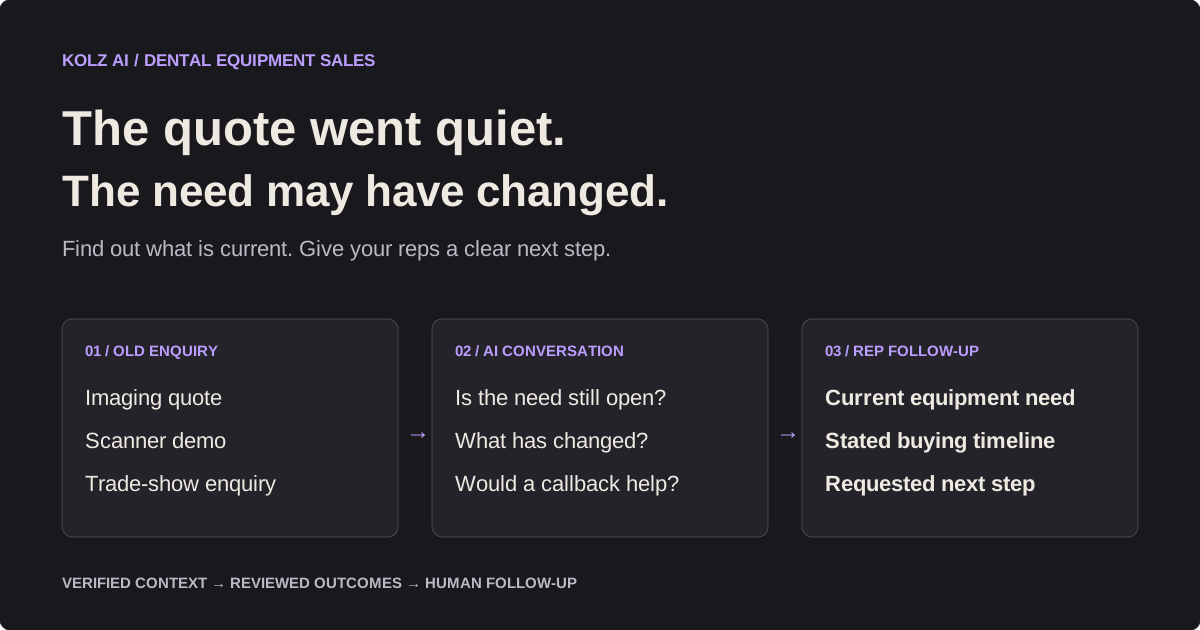
How to pursue 10× more dental sales activity with AI in 2026
In this piece
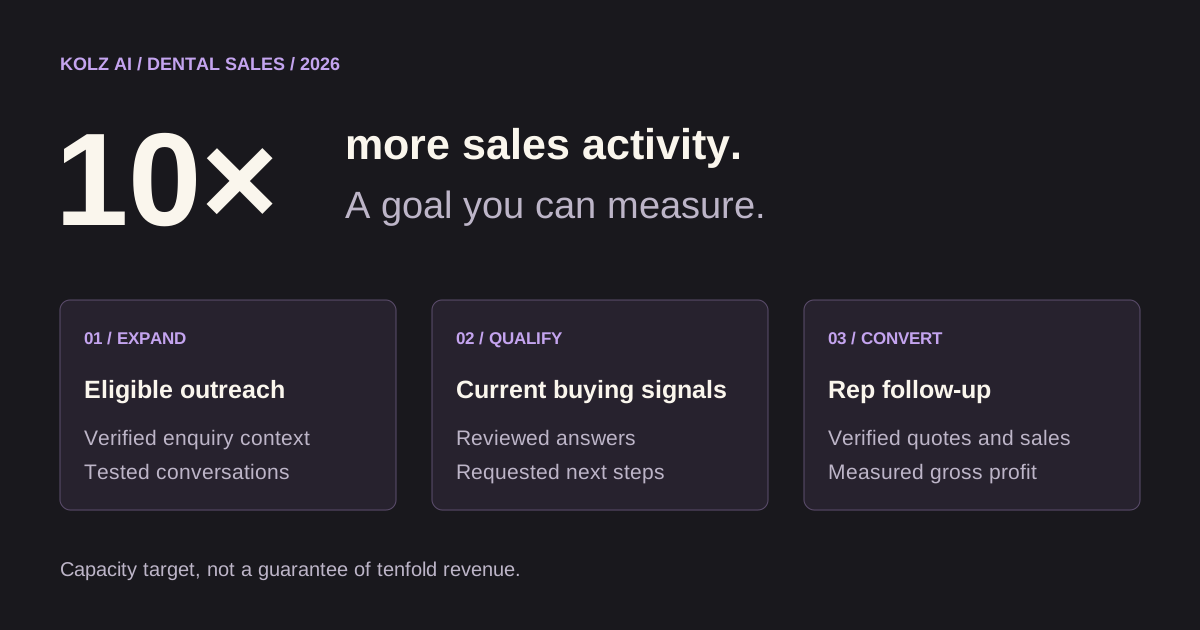
A practical sales playbook for dental equipment teams: expand qualified outreach, revisit stalled enquiries and give reps better buying context. Treat 10× as a capacity target, then measure what turns into sales.
AI can help dental equipment teams expand follow-up by checking whether verified enquiries are still active and capturing a buyer's requested next step. A useful 2026 sales workflow connects that outreach to equipment-specific questions, a named rep and verified purchasing outcomes.
Your equipment rep can explain a scanner, navigate a group purchase and help a practice plan an installation. But the same rep also spends time finding out whether an old enquiry is still relevant, who now handles purchasing and whether a practice wants to talk at all.
Those first questions are a useful place to introduce AI. A prepared voice agent can repeat a narrow qualification conversation across eligible contacts and record the answers for review. Your sales team can then spend more of its time on equipment decisions that need expertise.
The useful 10× goal is ten times more well-managed outreach activity, not a promise of ten times more revenue. You can measure whether AI expands capacity. You still have to establish whether those conversations create incremental quotes, completed sales and gross profit.
Explore the dental sales landing page or read the dental equipment reactivation guide for a sample agent prompt and cost model.
Find the sales bottleneck before adding calls
Write down where your team loses time or opportunities. An unanswered enquiry, an unassigned callback and a slow technical quote are different problems. More calling helps the first only if the list and conversation are appropriate; it can make the second worse if nobody can follow up.
For a dental equipment supplier, start by reviewing one month of pipeline activity:
- How many eligible enquiries received an initial follow-up?
- How many records still have an unknown current equipment need?
- How many requested callbacks were completed?
- How many qualified discussions became quotes?
- How many quotes became verified sales?
Keep the enquiry source and equipment category attached to each record. A replacement sterilizer request and a multi-location imaging project should not disappear into one blended conversion number.
Separate repeatable questions from specialist decisions
AI is most useful when the job is narrow enough to test. Give the agent verified context and define what it should establish. Leave questions outside those facts to the equipment specialist.
| Sales task | AI calling role | Human role |
|---|---|---|
| Revisit an expired quote | Ask whether the original project is still open | Check configuration and prepare an updated quote |
| Follow up a scanner demo | Record current interest and stated timing | Explain workflow, compatibility and evaluation options |
| Reach the purchasing contact | Confirm the relevant role or requested callback | Navigate stakeholders and procurement requirements |
| Check an expansion enquiry | Ask whether the planned timetable changed | Review installation and project scope |
| Handle pricing or financing questions | Use approved facts or capture the question | Confirm commercial terms and suitability |
| Close a deal | Record an agreed rep follow-up | Negotiate, verify requirements and complete the sale |
Do not ask the agent to imply that an appointment, quotation or demonstration is confirmed unless the actual configured workflow confirms it. Capturing a request and fulfilling it are separate actions.
Build three queues your team can work
Instead of one giant list, start with three queues that have different reasons for contact. Run each with a matching opening and a named follow-up owner.
Open enquiries. These are verified equipment requests that have not received a clear next step. Ask whether the contact wants to continue the discussion. Test the current process before expanding it.
Stalled evaluations. These are contacts who discussed a product or saw a demo and then paused. Ask whether the evaluation remains open and what changed. Avoid assuming that silence means price was the problem.
Dormant opportunities. These are old quotes or projects with reliable context and appropriate outreach permissions. Establish current interest rather than repeating the original pitch. Record a closed enquiry honestly if the practice bought elsewhere.
Do not treat a purchased dentist list or skip-traced phone numbers as a reactivation audience. Prior business engagement and permission for the proposed calls must be assessed separately.
Which records should enter the first campaign?
Choose records with a traceable reason for contact and an owner who can act on the answer. Keep the enquiry date, last meaningful interaction, equipment category, previous next step and assigned rep together. Enquiry age helps explain context; it does not establish that a buyer has budget or that outreach is appropriate.
For example, a scanner evaluation paused for a practice move deserves a different opening from a chair quote awaiting a site survey. Use the recorded reason for the delay when it is reliable. If the reason is unknown, ask whether the project remains relevant rather than inventing urgency. Exclude closed purchases, duplicate records and contact exclusions before choosing the segment size. Have the rep review ambiguous records first.
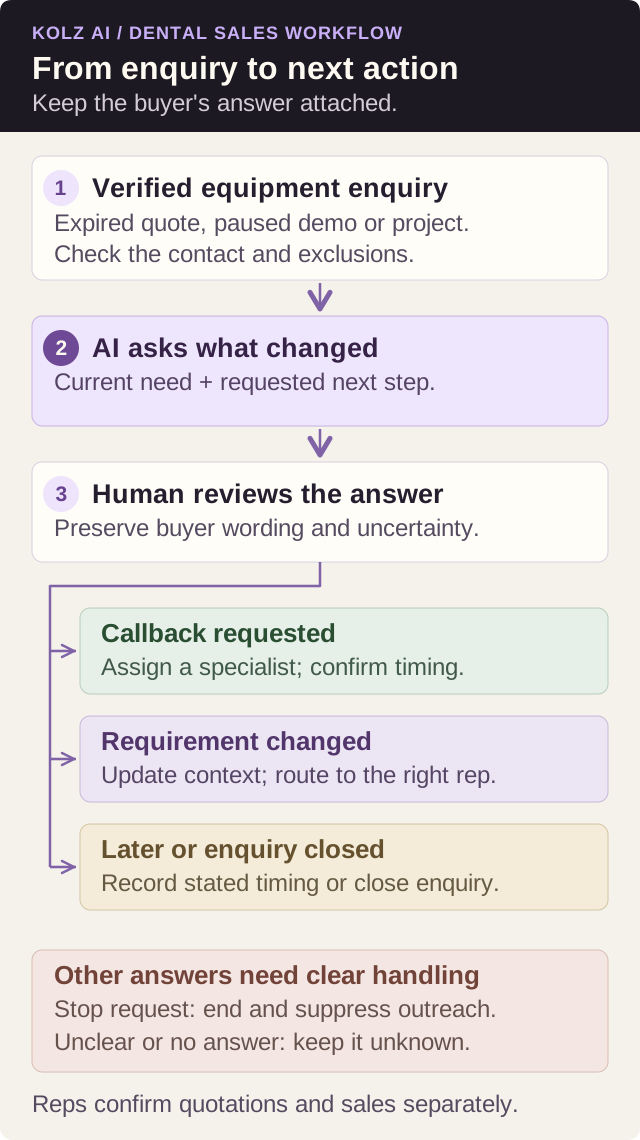
Diagram: from equipment enquiry to next action
An old enquiry becomes useful when the next action reflects the buyer's actual answer. The workflow below separates a requested callback from a changed requirement or a closed project. Review the conversation before updating the record, and carry contact exclusions into the next campaign.
Model a 10× capacity target
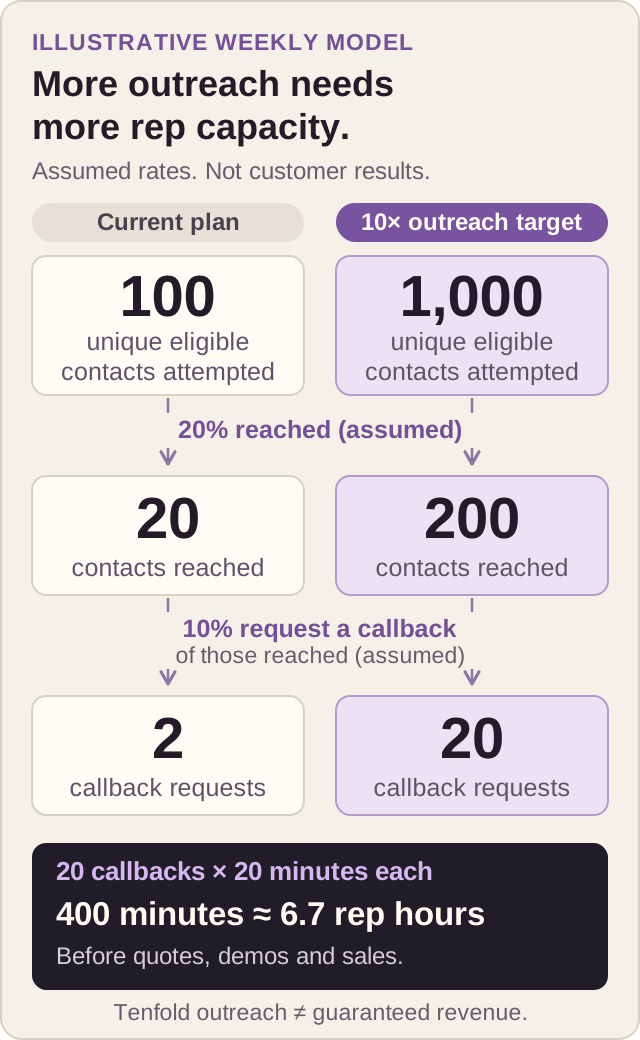
The following example illustrates planning arithmetic. It is not a Kolz customer result or a dental industry benchmark.
Suppose your current team attempts 100 unique eligible contacts per week. A tenfold target would be 1,000 unique contacts attempted per week. That establishes a throughput objective; it says nothing yet about answer rate, opportunity quality or sales.
| Planning metric | Current workflow | Illustrative target |
|---|---|---|
| Unique contacts attempted per week | 100 | 1,000 |
| Assumed answer rate | 20% | 20% |
| Contacts reached | 20 | 200 |
| Assumed callback request rate among reached contacts | 10% | 10% |
| Requested callbacks | 2 | 20 |
Both rates are assumptions. Actual results can change as you add older records or different segments. Twenty requested callbacks also require enough rep time to complete twenty follow-ups. If each callback takes 20 minutes, that is roughly 6.7 hours before quotation work or demonstrations.
The target therefore has two conditions: the calling workflow must manage the volume, and the rep workflow must handle the resulting requests. Available concurrency, conversation length, permitted calling windows and list quality affect what can actually run.
Make the conversation useful to a dental buyer
A busy front desk needs a brief purpose, not a product monologue. Confirm the right purchasing contact before sharing enquiry details. Introduce the business and the AI assistant, then ask whether it is a convenient time.
Use one accurate starting point: the previous imaging quote, the documented scanner enquiry or the specific project the practice discussed. Ask one question and wait.
For an interested contact, useful context might include the equipment category, whether the project is still planned, the decision-maker's role and any timing the contact volunteers. Only ask about budget if relevant and the person is willing to discuss it.
For a DSO or group practice, record whether the requirement belongs to one location or a central purchasing process. Do not assume that a local contact can approve a group agreement. Route the next conversation to the rep who understands that buying process.
If the contact declines, end politely. If they ask to stop contact, end the call and carry the opt-out into the actual suppression workflow. Persistent volume is useful only when the contact handling is accurate.
Ask equipment-specific questions that improve the next discussion
Qualification is useful when it identifies what the buyer needs to resolve before moving forward. Ask a small number of relevant questions, then record unanswered technical points for the specialist. The following questions are preparation examples, not a recommendation to purchase a particular device.
Intraoral scanners: establish which lab or software workflow the practice wants to use and whether a demonstration needs to include file transfer. Formats and licensing matter: 3Shape documents STL support in compatible third-party software and an active TRIOS license requirement for PLY export in its Unite export guide. Ask the rep to verify the proposed scanner, software version and destination workflow together; “open export” alone is not a compatibility decision.
Imaging and CBCT: ask which equipment evaluation was discussed, who should join the specialist conversation and whether installation or training questions are unresolved. The FDA's dental CBCT guidance describes three-dimensional imaging and emphasizes appropriate clinical use, optimized exposure and maintained equipment. Capture the purchasing question; leave clinical suitability and imaging protocols to qualified professionals.
Sterilizers: ask how the practice wants to handle cycle documentation, who owns training and what service or backup arrangements need review. CDC guidance identifies mechanical, chemical and biological monitoring, along with monitoring and maintenance records. These operational needs can inform a rep's discussion. A voice agent should not certify that an equipment purchase makes a practice compliant.
Chairs and operatory equipment: distinguish a replacement from a new-room project. Ask who owns the site survey, what configuration was quoted and whether utilities or construction remain unresolved. The A-dec 311 pre-installation guide covers structural and utility requirements for that system. Use the exact model's documentation and installation specialist; requirements should not be generalized across chairs.
Turn callbacks into a sales process
Every requested callback needs an owner, a reviewed summary and a next action. Preserve the buyer's wording about timing. A vague “maybe later” should not turn into a fabricated purchase deadline.
Before a rep responds, review the equipment context and the actual request. Does the contact want a refreshed quote, a specification discussion or a demonstration? Do they need the technical specialist rather than a generic sales call?
An illustrative handoff might read: “Previous scanner enquiry; practice manager says evaluation remains open. Wants the rep to confirm transfer to the named lab before arranging another demonstration. Requested a call Thursday afternoon; purchasing authority not confirmed. Assigned scanner specialist to review software and licensing, then agree a next step.” This is useful because it separates buyer statements, unresolved facts and rep work. It does not turn a callback request into a booked demo or a forecast sale.
Use the supported results export/import workflow to update your CRM. Preserve a stable identifier so repeat attempts do not become duplicate people in the report. Keep outreach exclusions separate from lead scores so a future import does not restore an opted-out contact.
If requested callbacks accumulate faster than your reps can handle them, reduce campaign volume. Increasing calls while follow-up stalls is an expensive way to manufacture a backlog.
Measure sales separately from activity
Report the funnel with explicit denominators and a visible observation window:
| Metric | Definition |
|---|---|
| Reach rate | Unique contacts reached ÷ unique contacts attempted |
| Callback request rate | Unique contacts requesting a callback ÷ unique contacts attempted |
| Follow-up completion | Completed requested callbacks ÷ callback requests |
| Quote rate | Unique contacts receiving a verified quote ÷ unique contacts attempted |
| Customer conversion | Verified purchasing customers ÷ unique contacts attempted |
| Cost per customer | Defined campaign and follow-up cost ÷ verified purchasing customers |
Report a zero denominator as unavailable. Count people separately from attempts, and distinguish a quoted opportunity from a completed sale.
Include preparation, usage, review, rep follow-up and other defined costs. For ROI, use attributed gross profit and the full defined cost rather than dividing a large equipment sale by calling charges alone. Check current Kolz pricing and reconcile modeled usage against billing records.
If you want to estimate incremental impact, consider a comparable group that does not receive the AI outreach during the observation window. Track normal sales activity in both groups. Without a credible comparison, describe campaign-attributed outcomes and avoid claiming that AI caused every sale.
Campaign results: what the published output actually shows
Kolz's published campaign output contains 1,000 ended call rows, including 275 marked answered: a 27.5% answered-row rate. This is operational evidence from the campaign output example. The example is not identified as a dental equipment campaign, so use it to understand reporting rather than predict dental sales.
| Recorded call result | Rows | Share of 1,000 ended rows |
|---|---|---|
| Answered | 275 | 27.5% |
| Voicemail | 517 | 51.7% |
| Not answered | 149 | 14.9% |
| Cut short | 59 | 5.9% |
The output also has 846 rows with transcripts and scores. That count is a separate reporting measure; a transcript or score does not establish buyer interest. These are call rows, not verified unique contacts. The published output has no confirmed interest, success or sales outcome fields, so it cannot substantiate appointments, dental equipment revenue or ROI.
For your dental pilot, reproduce the operational report first, then add reviewed purchasing outcomes, completed rep follow-ups and verified sales from your own records. Show the observation window and the unique-contact denominator alongside any conversion rate.
Launch a pilot, then earn the expansion
Start with one prepared segment sized to your review and follow-up capacity. Test a busy contact, a gatekeeper, a wrong number, an opt-out and a technical question the agent cannot answer. Review both promising and low-scored conversations.
Agree the review decision before launching. For an illustrative pilot, a team could review every conversation in its first small batch, check that all requested callbacks have an owner and pause expansion if technical answers were invented or contact exclusions failed. After correcting issues, run another manageable batch and compare reviewed buying context, completed follow-ups and full costs. These are example operating criteria, not universal conversion benchmarks.
Retain the original result and the reviewer's correction separately so you can see whether the prompt improved. Expand the segment only when reps can act on the answers; wait for the observation window to finish before judging sales. A weak result may mean the list, opening or handoff needs revision, rather than that the solution is more calls.
Keep patient information out of equipment-sales uploads and prompts. Use approved product facts and route clinical, compatibility or regulatory questions to specialists. See HHS guidance when assessing privacy obligations, and the FDA classification database for particular device classifications.
Review applicable calling and recording requirements for the actual audience. AI-generated voices fall within the FCC's artificial-voice interpretation under the TCPA; a business contact is not a blanket exemption. See the FCC ruling and Kolz calling guidance.
Expand after the conversation is accurate, the team completes follow-up and the measured results justify more volume. Ten times more activity is a useful ambition when each stage remains accountable. Better sales come from what happens after the phone rings.
Frequently asked questions about AI dental equipment sales
How can AI help a dental equipment sales team?
AI can revisit verified equipment enquiries, establish whether a project is still open and capture a requested next step for a sales rep. Use a narrow conversation for scanner demos, imaging quotes or deferred upgrades. Your equipment specialist should handle configuration, compatibility, commercial terms and closing.
Can AI produce 10× more dental equipment sales?
Ten times more outreach activity is a capacity target, not a verified sales result. AI may expand the number of eligible contacts your workflow can attempt, but revenue depends on buyer need, list quality, pricing and completed follow-up. Measure verified customers and gross profit separately from call volume.
What results has Kolz published for an AI calling campaign?
The published output example shows 1,000 ended call rows: 275 answered, 517 voicemail, 149 not answered and 59 cut short. It also includes 846 rows with transcripts and scores. It is not confirmed as a dental campaign and does not establish unique buyers, equipment sales or ROI.
Can this workflow support DSO equipment purchasing?
It can help establish whether an enquiry belongs to a local practice or a dental service organization's central purchasing team. Record the contact's role, stated equipment need and requested follow-up. A human rep should handle procurement, multi-location requirements and purchasing authority.
Can I upload dental equipment leads from my CRM?
You can prepare eligible business contacts as CSV or Excel and confirm the phone and name column mappings in the upload interface. Keep verified equipment context in supported columns and test the available prompt variables before launch. Review and match exported results when updating your CRM; confirm the actual workflow rather than assuming an automatic CRM integration.
What does an AI dental sales campaign cost?
Usage pricing depends on the selected pack and its current terms. Check Kolz pricing, estimate billable minutes and include list preparation, conversation review and rep follow-up in your budget. Reconcile the estimate against billing records; answered-call time alone may not equal total billable usage.
How should a dental equipment team start a pilot?
Start with one equipment category and a segment small enough for your team to review and follow up. Test wrong numbers, gatekeepers, opt-outs and technical questions before calling the audience. Upload business purchasing information only; exclude patient names, treatment records and clinical notes. Review the answers and completed callbacks before increasing volume.
Start with 100 free minutes · Explore dental equipment sales in 2026 · Get the dental agent prompt
Ready to try AI-powered calling?
See how Kolz AI can automate your outbound calls, qualify leads, and scale your customer outreach.
Test with 100 free minutes