← Guides

Guide / The concept explained

AI database reactivation, explained

What database reactivation actually is, how it differs from cold calling, where AI genuinely helps, and what to measure. Vendor-neutral: this page explains the practice, not a product.

See how Kolz runs it →Workflow, costs and an ROI calculator
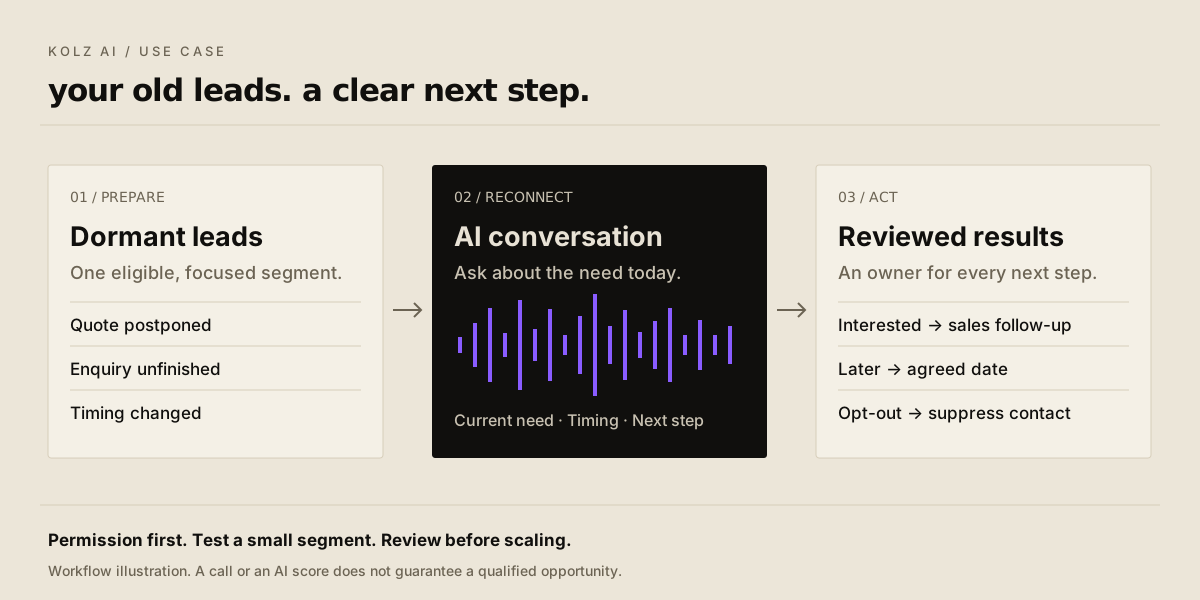
Prepare dormant leads, reconnect with AI conversations, then review and assign follow-up

What database reactivation means

A quiet lead is not always a lost lead. Budgets change, projects restart, and a “not now” can become a “let’s talk.” The challenge is finding those changes across a database your team no longer has time to work through.

Database reactivation is contacting people already in your records to find out whether an earlier need is relevant again. It is defined by the audience, not the channel: the same practice runs over email, SMS or the phone. What makes it distinct from cold outreach is that a prior relationship exists and can be referenced accurately.

A useful outcome is not only a sale. An interested buyer, a requested callback, a clear “not now” and an opt-out all make your records more accurate than silence does.

Reactivation vs cold calling

Compare audience, context, objective and permission requirements
QuestionReactivationCold calling
Who is contacted?Someone already in your recordsA prospect without a prior conversation
Where does the opening start?Verified past context and what changedAn introduction and reason for the call
What are you finding out?Whether a previous need is currentWhether there is an initial relevant need
Is permission automatic?No. Old enquiries do not establish every type of consent.No. Being on a prospect list does not grant consent.

AI is the calling method; reactivation describes the audience and purpose. Neither guarantees a higher conversion rate. Compare pilot results for your own segments.

What changes with AI?

01 / SPEED

Less waiting between conversations

A configured agent can repeat the outreach workflow across your list, reducing the manual work of dialling, asking the same opening questions and writing up each response.

02 / SCALE

One campaign. A larger list.

Parallel calling can move several conversations forward at once. Actual throughput depends on available concurrency, answer rates, call length and permitted calling windows.

03 / FOCUS

A clearer queue for your team

Separate renewed interest from “later,” wrong numbers and opt-outs. Your salespeople can spend their follow-up time on people who have asked to speak.

How scale works

More conversations in parallel.

One-at-a-time outreach

Call 1
Call 2
Call 3

Parallel outreach

Call 1Call 2Call 3

Parallelism reduces the time needed to work through a list; it does not reduce the time each person needs for a useful conversation. Start with a pilot to measure your actual pace.

From spreadsheet to next step.

01

Prepare

Choose one eligible segment. Keep verified enquiry context, remove duplicates and opt-outs, and confirm the permissions for your outreach.

02

Test, then run

Whichever tool you use, script the opening, the qualifying questions and what counts as success, then test the conversation on a handful of contacts before applying it to a full list.

03

Review and follow up

Read the outcomes, summaries and transcripts. Assign requested callbacks, update your records and keep opt-outs suppressed.

Measure the effect beyond call volume.

A larger campaign is useful when it creates follow-up your team can act on. Track the journey from a reached contact to a real customer, and compare results across segments.

Reached

People who actually spoke

Interested

A current, relevant need

Followed up

The agreed next step happened

Converted

A verified business outcome

AI cannot create demand where none exists. List quality, a relevant offer and timely human follow-up still decide the result. Increase volume only as fast as your team can handle the responses.

Go deeper / optional guides

Apply it to your industry.

Open a mini guide for the right list, a tailored agent prompt and dashboard test mode. Research sources and recording placeholders are inside each guide.

01Real estateFind the buyers whose timing has changed.
01Real estate

Find the buyers whose timing has changed.

A property enquiry can go quiet because the move is months away. Revisit eligible buyers who asked for more time, instead of treating every old enquiry as lost.

Follow Up Boss: re-engaging stale leads

Start with this list

Past buyer enquiries marked not ready; exclude active negotiations and opted-out contacts.

How Kolz helps

Export one buyer segment to CSV/Excel. Give Kolz the verified enquiry context and ask about current search area, budget range and moving timeline. Review the answers and pass agreed callbacks to an agent.

01

Still looking?

02

Area + budget

03

Moving timeline

04

Agent callback

A useful outcome: The buyer wants a conversation with an agent and provides a timeframe. An agent reviews suitability; the AI does not choose who gets housing.

Your real estate prompt

Available in Dashboard → Test Call. Select this industry agent, replace the example details, then edit and test it.

Open dashboard test mode →
Read the tailored prompt
You are the AI calling assistant for [AGENCY]. Contact only the permission-checked buyer segment supplied by our team. Replace these bracketed setup fields before launch. Use only verified prior-enquiry context; never invent a property or interaction.

OPEN: Identify yourself as an AI assistant for [AGENCY]. Explain the real reason for following up and ask if now is a good time.

ASK, ONE AT A TIME: Are they still looking to buy? Which area and type of property do they want? What budget range would they like the agent to work with? What is their moving timeline? Would they like an agent callback, and when? Skip questions already answered.

BOUNDARIES: Do not ask about protected characteristics, steer neighborhoods, assess housing eligibility, give mortgage advice, promise availability, or claim a viewing is booked. Send property-specific questions to a human agent.

OUTCOMES: interested / later / no longer looking / wrong number / opt-out. Stop the pitch on an opt-out and flag suppression for the team. Record stated preferences, timeframe, callback permission and requested time. Success means an explicitly requested agent follow-up, not a polite response.

Real estate / call recording

--:--

Recording coming soon

Try this industry agent in Dashboard → Test Call while we prepare the recording.

02Home servicesReopen the estimates that never became jobs.
02Home services

Reopen the estimates that never became jobs.

HVAC, roofing and plumbing teams often have unsold estimates waiting for a decision. Follow up on the project and its timing, with a clear route back to the estimator.

ServiceTitan: unsold-estimate follow-up

Start with this list

Unaccepted estimates for one service type; exclude completed jobs, disputes and opt-outs.

How Kolz helps

Export eligible estimates, then configure Kolz with the service requested and verified estimate context. Ask whether the project is still needed and what held it up. Give the office a reviewed list of quote-review requests.

01

Project active?

02

Reason for delay

03

Preferred timing

04

Estimator callback

A useful outcome: The homeowner requests a quote review or office callback. The office confirms prices and availability.

Your home services prompt

Available in Dashboard → Test Call. Select this industry agent, replace the example details, then edit and test it.

Open dashboard test mode →
Read the tailored prompt
You are the AI assistant for [SERVICE COMPANY], following up on a permission-checked list of unsold [SERVICE TYPE] estimates. Replace setup fields before launch. Use only the supplied, verified estimate context.

OPEN: Identify the business and yourself as an AI assistant. Ask if this is a good time to follow up on the estimate.

ASK, ONE AT A TIME: Is the project still needed? Did timing, scope or another concern delay it? When would they like the work considered? Would a callback from the estimator help? Capture their preferred callback time.

BOUNDARIES: Do not invent discounts, financing terms, quote validity, technician availability or confirmed appointments. Do not troubleshoot dangerous electrical, gas or structural issues. For an urgent safety issue, stop the sales discussion and advise contacting appropriate local emergency help.

OUTCOMES: quote review requested / later / completed elsewhere / no longer needed / wrong number / opt-out. Acknowledge opt-outs, end politely and flag suppression. Summarize the concern in the customer's own words. Success means the customer explicitly asks for an office or estimator follow-up.

Home services / call recording

--:--

Recording coming soon

Try this industry agent in Dashboard → Test Call while we prepare the recording.

03Automotive dealershipsReconnect with shoppers who left without buying.
03Automotive dealerships

Reconnect with shoppers who left without buying.

An unsold showroom visit or old vehicle enquiry can still represent an active search. Reconnect around what the shopper wants now, without promising stock or finance terms.

VinSolutions: unsold and lost lead workflows

Start with this list

Unsold enquiries for one vehicle category; remove purchased, active-deal and opted-out records.

How Kolz helps

Upload the eligible shopper list with verified vehicle interest. Let Kolz ask whether they are still shopping, what changed and whether they want a sales callback. Review outcomes before a salesperson checks inventory and arranges a visit.

01

Still shopping?

02

Vehicle needs

03

Purchase timing

04

Sales callback

A useful outcome: A shopper requests contact from the sales team. Inventory and any visit time still need confirmation.

Your automotive dealerships prompt

Available in Dashboard → Test Call. Select this industry agent, replace the example details, then edit and test it.

Open dashboard test mode →
Read the tailored prompt
You are the AI assistant for [DEALERSHIP]. Follow up only with permission-checked unsold shoppers. Replace setup fields before launch and use only verified prior vehicle interest.

OPEN: Identify the dealership and yourself as an AI assistant. Ask if now is a good time to revisit their enquiry.

ASK, ONE AT A TIME: Are they still shopping? Are they looking for the same vehicle type or has the requirement changed? What features matter now? When are they hoping to buy? Would they like the sales team to call, and when?

BOUNDARIES: Never claim a vehicle is in stock without verified current data. Do not quote unverified prices, trade-in values, finance approval, interest rates or discounts. Do not request a Social Security number, credit score or payment details. Do not claim a test drive is booked; record the request for staff to confirm.

OUTCOMES: sales callback requested / later / already purchased / no longer shopping / wrong number / opt-out. End promptly on opt-out and flag suppression. Summarize vehicle preferences, timing and agreed follow-up. Success requires explicit permission for a sales callback.

Automotive dealerships / call recording

--:--

Recording coming soon

Try this industry agent in Dashboard → Test Call while we prepare the recording.

04Staffing & recruitmentRefresh your talent pool before sourcing again.
04Staffing & recruitment

Refresh your talent pool before sourcing again.

Someone who was unavailable for the last role may be open to the next one. Re-engagement helps recruiters update existing candidate records and identify people who want a conversation.

Bullhorn: candidate re-engagement

Start with this list

Inactive candidates in one role family with valid contact permission; exclude do-not-contact and currently placed records as appropriate.

How Kolz helps

Export one eligible role-family segment. Ask Kolz to collect current interest, preferred role type, availability and recruiter callback requests. Review the responses and update your ATS through your normal process; no automatic ATS integration is assumed.

01

Open to contact?

02

Role preference

03

Availability

04

Recruiter callback

A useful outcome: A candidate requests a recruiter conversation. Hiring and placement decisions remain with the recruiter.

Your staffing & recruitment prompt

Available in Dashboard → Test Call. Select this industry agent, replace the example details, then edit and test it.

Open dashboard test mode →
Read the tailored prompt
You are the AI assistant for [STAFFING AGENCY]. Reconnect with permission-checked candidates in [ROLE FAMILY]. Replace setup fields before launch. This is a preference-update conversation, not an interview or selection decision.

OPEN: Identify yourself as an AI assistant and name the agency. Refer only to verified prior contact. Ask whether now is a good time and whether they are open to hearing from a recruiter.

ASK, ONE AT A TIME: Which role types interest them now? When might they be available? What working arrangement or shift do they prefer? Would they like a recruiter callback, and when? Do not press if they prefer not to answer.

BOUNDARIES: Do not collect age, health, disability, religion, family status or other protected details. Do not rank suitability, reject candidates, infer eligibility or promise a job, pay rate or placement. Route role-specific and eligibility questions to a human recruiter.

OUTCOMES: recruiter callback requested / later / not currently interested / wrong number / opt-out. Stop on opt-out and flag suppression. Record only volunteered job preferences, availability and requested follow-up. Success means an agreed recruiter conversation, not a hiring recommendation.

Staffing & recruitment / call recording

--:--

Recording coming soon

Try this industry agent in Dashboard → Test Call while we prepare the recording.

Frequently asked questions

What is AI database reactivation?

It is contacting people already in your records, using an AI voice agent, to find out whether an earlier need is relevant again and to agree a next step. The audience defines it; AI is only the method of making the calls.

How is it different from cold calling?

The contact already exists in your records and a prior enquiry can be referenced accurately. That changes the opening and the question you are asking, but it does not by itself grant permission to call.

Which industries are a strong fit?

Real estate, home services, automotive dealerships and staffing have documented workflows for re-engaging old enquiries, estimates, shoppers or candidates. These are researched examples, not a measured ranking of industry adoption.

Can I call everyone in an old database?

No. You need valid consent covering the type of outreach you plan, including AI calls, that has not been withdrawn. A past enquiry does not automatically establish it. Keep consent records, honour opt-outs and check local calling-window and recording rules.

Does AI make old leads convert better?

Not on its own. AI changes the cost and pace of making the calls. List quality, the relevance of your offer and timely human follow-up still decide whether anything converts.

What counts as a successful reactivation?

An agreed next step your team can act on: a callback, a quote review, a sales conversation or a recruiter follow-up. Read the underlying response; a score alone is not proof of intent.

Does this replace your CRM?

No. Reactivation calling produces outcomes you then feed back into whatever system of record you already use.

Next

See what this costs to actually run.

The companion guide walks through the Kolz workflow step by step, prices a 10,000-contact campaign at $0.03 per minute, and includes an ROI calculator you can run against your own numbers.

How Kolz runs database reactivation →